
Tirly
Block apps by rule, and keep them blocked while a friend is in the room.
Tirly is not on either store yet. It is built for Android first, and the iPhone version is in development.

What Tirly is
Tirly blocks the apps you'd rather not open, and it does it best when your friends are around.
You write rules. A rule names the apps it covers, what switches it on, and how it can be unlocked. While a rule holds, opening one of its apps shows a quote instead of the feed, with a button to close the app.
Rules are checked on your phone. Whether a block is in force, and which apps you open, stays there.
Presence with a friend
The trigger Tirly was built for.
Add a friend, make a rule, and the moment their phone is in the room with yours the apps you chose are blocked. When they leave, the block lifts.
Presence is measured between the two phones over Bluetooth plus a short tone above the range of hearing, which is what tells the room from the next room. Bluetooth alone cannot: a wall barely changes its signal. Sound does not pass through a wall the same way.
No location is used for it. The microphone opens for about a second at a time, the recording is reduced on the phone to a few numbers about whether the tone arrived, and no audio is kept or sent to the other phone or to us.
Presence rules are free, and you can make as many as you like, one friend or many.
Rules and triggers
Rules that switch on when it matters.
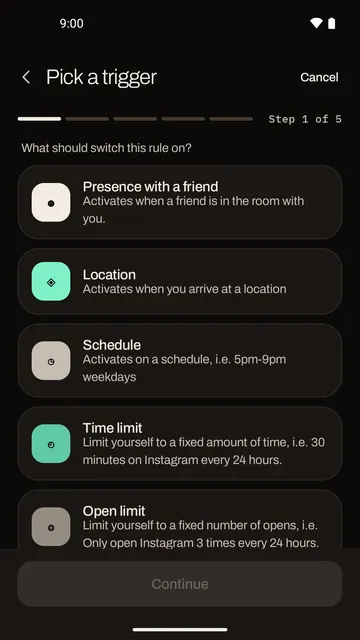
Every rule has one trigger. There are six.
- Presence with a friendWhen a friend's phone is in the room with yours.
- LocationWhen you arrive at a place you name.
- ScheduleAt set times, say 5pm to 9pm on weekdays.
- App time limitAfter a set amount of time in the apps it covers.
- Total time limitAfter a set amount of time on the phone as a whole.
- Open limitA number of opens of a set length, say Instagram 5 times a day, 15 minutes each.
Unlock modes
Decide how hard a rule is to unlock.
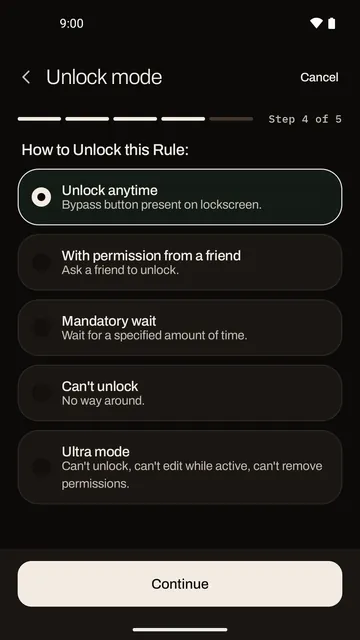
You choose this when you make the rule, so the decision is made by you at your calmest, not by you at your weakest.
- Unlock anytimeA button on the block screen lets you through.
- With permission from a friendAsk a friend, for a number of minutes you pick. They say yes or no.
- Mandatory waitWait out a set amount of time first.
- Can't unlockNo way around it while the rule is active.
- Ultra modeCan't be unlocked, edited, or stripped of its permissions while active.
A Tirly
Put every phone down, together.
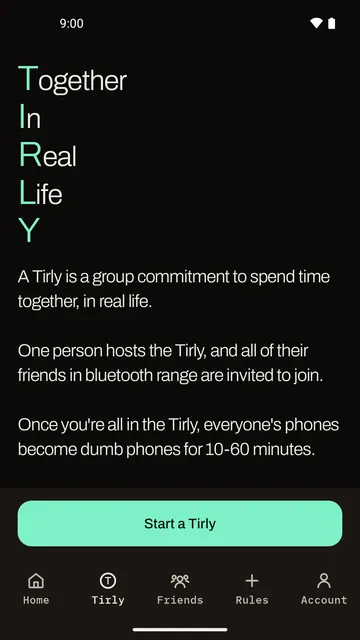
A Tirly is a group commitment to spend time together, in real life. Tap Start a Tirly, let your friends join over Bluetooth or by the link, and lock it.
Every phone in the Tirly becomes a dumb phone for ten to sixty minutes, the host's included. Calls still work, and so does the home screen. You can leave at any time, but everyone else is told.
Friends and screen time
Your friends' screen time, side by side.
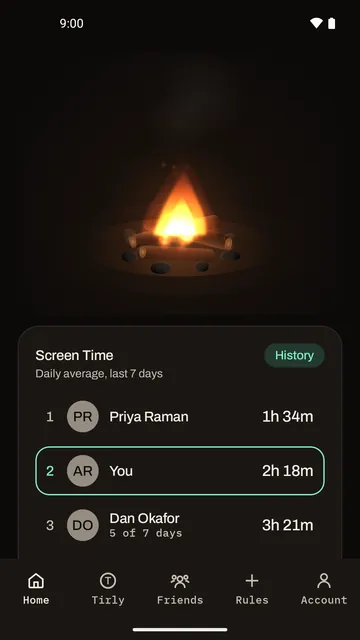
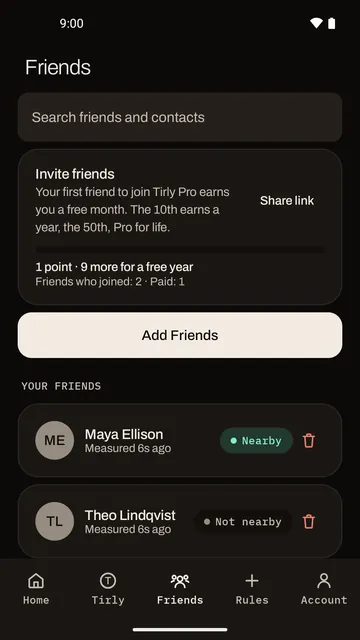
Home shows a board of your friends' daily average screen time over the last seven days, next to yours. Only people you have accepted as friends are on it, and removing a friend takes you both off each other's board.
What goes up is one number per day, your total. No app names, no times of day.
Tirly Pro
Tirly Pro, when one rule isn't enough.
Tirly is free to use with presence rules. Pro is for people who want more kinds of rule and firmer ones.
| Feature | Free | Pro |
|---|---|---|
| Presence-with-a-friend rules | Unlimited | Unlimited |
| Rules of any other kind | One | Unlimited |
| Unlock modes | Unlock anytime | All five |
| Allow-only lists | No | Yes |
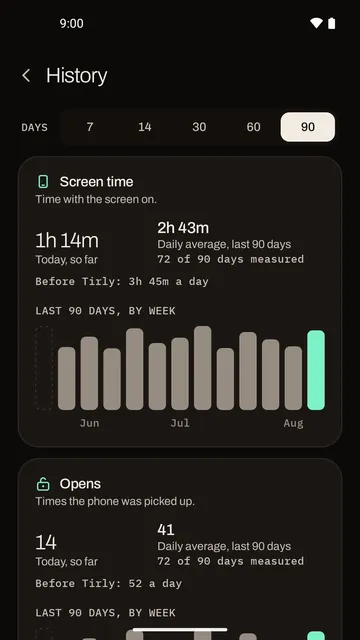
| Screen time history | No | Up to ninety days |
| Web blocking in your browser | No | Yes |
| Share with five people | No | Yearly and lifetime plans |
With web blocking, a rule's websites are blocked in your browser, not only its apps. Your first friend to join Tirly Pro earns you a free month, the tenth a year, the fiftieth Pro for life.
Privacy
What leaves your phone.
Tirly shows no ads, uses no analytics libraries, and never sells your information. Here is the short version of what goes to our servers and what does not.
Goes to our servers
- Your phone number as a hash, which is also what matches your contacts. The number itself only passes through on the way to the code we text you.
- The name you give yourself. Friends, and anyone in a Tirly with you, see it.
- Who your friends are.
- A copy of your rules, so they come back on a new phone. A location rule's place is part of that copy.
- One screen time total per day, for your friends' board.
- When you ask a friend to unlock, the app you asked about, for how long, and their answer.
Stays on your phone
- Which apps you open, and when a block starts or lifts.
- Any sound the microphone hears. It is reduced on the phone to a few numbers and never stored or sent.
- Where you are right now. A location rule is checked on the phone.
- Your contacts' names. Their numbers are matched only as hashes.
- The sites you visit. Web blocking reads the address bar only for sites a rule covers, and no address or browsing history is stored or sent.
The full account, including every service Tirly relies on, is in the Tirly privacy policy.
Permissions
What Tirly asks for, and why.
- Usage access and drawing over other apps, to see which app is in front and draw a block over it.
- Nearby devices and the microphone, for presence with a friend.
- Location, only for location rules.
- An accessibility service, only for web blocking.
Each is explained on screen before it is asked for.
Questions about Tirly: info@rayetechnology.com.